Saturday, 16 July 2011

HACK or Simply Change XP Start Button Name

First Step The first step is to make a backup copy of the file explorer.exe located at C:\Windows\explorer. Place it in a folder somewhere on your hard drive where it will be safe. Start Resource Hacker and open explorer.exe located at C:\Windows\explorer.exe
The category we are going to be using is String Table In Resource Hacker. Expand it by clicking the plus sign then navigate down to and expand string 37 followed by highlighting 1033. If you are using the Classic Layout rather than the XP Layout, use number 38. The right hand pane will display the stringtable as shown in Fig. 02. We’re going to modify item 578, currently showing the word “start” just as it displays on the current Start button.

There is no magic here. Just double click on the word “start” so that it’s highlighted, making sure the quotation marks are not part of the highlight. They need to remain in place, surrounding the new text that you’ll type. Go ahead and type your new entry

Friday, 15 July 2011

Learn the Tricks To Earn Money From Facebook


Before you read this post I want that you should ask these question to yourself and continue reading only if you feel that you have a postive response for all these questions?
Have you ever wanted to earn money online?
Have you ever wish to earn big money?
Do you want to earn this money quickly?
Do you want to earn money without investing big amount?
Well if you are still reading this post then you might be changing your life..and ofcourse I am serious.The best way to earn money online is via facebook because it has
  • More than 400 million active users
  • More than 60 million status update posted each day
  • More 35 million users update their status every day
  • More than 3 billion photos uploaded to the site each month
  • More than 5 billion pieces of content shared each week
  • More than 3 million active pages
So, why are you missing such big opportunity to earn online.The tricks to earn from facebook has been tested.
What is Not Required to Earn from Facebook
  • Any Kind of programming Skills
  • Any Complex Stuff
Just follow the tricks mentioned in the ebook and you can earn really BIG.
So what is required on your part?
There is a little effort which you have to put to earn and if you are lazy enough or don’t have the desperation to put some effort to earn then PLEASE STOP READING THIS POST!!
You don’t have to put any extra effort to earn from facebook just follow the tricks explained in the ebook  and then keep counting the money!!


CLICK HERE TO DOWNLOAD EBOKK TO DOWNLOAD MONEY FROM FACEBOOK

Funny Trick To Hack Facebook

If you really want to impress someone with your hacking skills then this trick will surely help you.Well this is actually not any hacking just a simple javacript trick but the other person will surely believe you as a hacker.
So what can you do with this trick?


You can edit content of any website including facebook,myspace,twitter etc.For instance see the pic ABOVE   (click to zoom)

Trick on How To Change Colour Of Facebook

Most of us have our profiles on facebook and many of us login into our facebook accounts daily.Aren’t you get bored of same old facebook features.If you want something refreshing then I have a facebook trick for you.By using this simple trick we will change the colour of the facebook.You can select any colour of your choice.
This trick has following Requirements
  • Mozilla Firefox browser
  • Greasemonkey
  • Facebook Script
I will be providing you the links and instructions for the Greasemonkey and facebook Script.So here is the step by step tutorial with screenshots for trick to change the color of facebook.

Kaspersky Anti-Virus 2010

Kaspersky Lab, a leading developer of secure content management solutions, announces that Kaspersky Anti-Virus 2010 has earned a top award from AV-Comparatives following testing by the highly respected Austrian test lab.
AV-Comparatives conducted a comparative test on 16 popular antivirus solutions in December 2009 that measured the impact of antivirus software on system performance. The test aimed to demonstrate to what extent various antivirus programs slow down the performance of common user tasks. The test included seven typical operations performed by users such as copying, archiving and decoding files, downloading applications from the Internet, and installing and launching programs. The popular WorldBench testing suite was also used.
Kaspersky Anti-Virus 2010 received a rating of Advanced+, having demonstrated minimal impact on computer performance. The Kaspersky Lab product scored higher in testing than the antivirus solutions from McAfee, Symantec, Microsoft, AVG, ESET, G DATA, Bitdefender and Avast.
Kaspersky Lab's range of personal products, Kaspersky Anti-Virus 2010 and Kaspersky Internet Security 2010, are at the cutting-edge of information security. Kaspersky Internet Security 2010 combines advanced application control technology that assigns a risk rating to previously unknown malware with the innovative Kaspersky Security Network distribution system and unique sandbox virtualization technology that provides a safe environment in which to run suspect applications.

HOW TO DOWNLOAD 
 CLICK   >>>>>>>>> HERE

Thursday, 14 July 2011

AVAST ANTIVIRUS FREE DOWNLOAD

Avast 6 free version has got new Additional Protection which includes Auto Sandbox, Web Rep and Site Blocking. Let us see these features in brief :
Auto Sandbox : If you execute any suspicious program, then Avast runs it in a sandbox, so that no harm is done to your operating system and your files. I think this is a great addition to Avast’s Arsenal and that too for free!

ESET FREE DOWNLOAD LATEST VERSION

ESET NOD32 Antivirus proactively detects and disables viruses, trojans, worms, adware, spyware, phishing, rootkits and other Internet threats. ESET NOD32 Antivirus provides: 1) Proactive Protection - multiple layers of detection protecting you from Internet threats before it is too late. 2) Precise Detection - accurately identifies known and unknown threats; it consistently wins top awards from testing labs and is recognized for having zero false positives. 3) Lightweight Design - requires less memory and CPU power, allowing your computer to run fast and have more room for games, web browsing, and emailing. 4) Fast

Wednesday, 13 July 2011

WEEBROOT ANTIVIRUS FREE DOWNLOAD 2011

Webroot Antivirus with Antispyware provides powerful protection against viruses, spyware, keyloggers, rootkits, and other online threats. Advanced detection technology thoroughly scan your computer to identify and remove harmful programs, and the same shield protection featured in Spy Sweeper, the best-selling antispyware solution, helps block new threats before they infect your PC. Webroot AntiVirus includes integrated online backup and restore capabilities to protect your digital photos and other irreplaceable files against damage or loss due to hard drive crashes, fire, theft, or accidental deletion.


What's new in this version: 
Version 7.0.4 may include unspecified updates, enhancements, or bug fixes.

HOW TO DOWNLOAD ?

CLICK >>> HERE

AND THEN CLICK ON  CLICK HERE TO DOWNLOAD FROM MEDIAFIRE

HOW TO DISPLAY WINDOWS VERSION ON DEKSTOP?


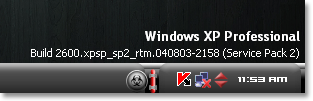
Most of you might have noticed Windows version on the desktop in the lower right-hand corner during beta releases of windows.Lets now see a quick trick on doing this in your windows platform.I tested this registry hack in Windows Xp, Vista and Windows 7 and its working fine icon smile Simple Trick to Display Windows Version on Desktop

Steps to show windows version on Desktop

1. Goto Start –> Run (Windows Key + R)
2. Type Regedit and hit Enter.
3. In Registry editor, navigate to this key:
HKEY_CURRENT_USER\Control Panel\Desktop
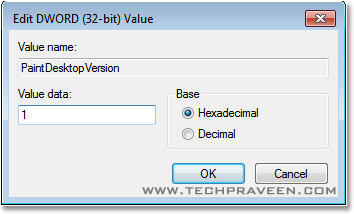
4. Select “Desktop” in left pane and search for “PaintDesktopVersion” in right pane and double-click it.
5. A dialog will pop-up, change the “Value Data” field from 0 to 1.
  

6. Restart the Windows you will find Windows version printed on the desktop.
Check Windows version on the desktop in the lower right-hand corner. icon smile Simple Trick to Display Windows Version on Desktop
Note:
If you wish to remove the watermark, just change the “Value Data” field back to 0.

Sunday, 10 July 2011

HOW TO BLOCK SITES ON COMPUTER WITHOUT USING ANY COMPUTER


It is very easy to block sites on computer without any software. This trick will work on Windows XP,Windows Vista, and Windows 7. I have tried this trick on all windows and it really works. Follow the steps below to learn how to block sites on computer.  


Twitter Delicious Facebook Digg Stumbleupon Favorites More

 
Design by Free WordPress Themes | Bloggerized by Lasantha - Premium Blogger Themes | Best Web Host